

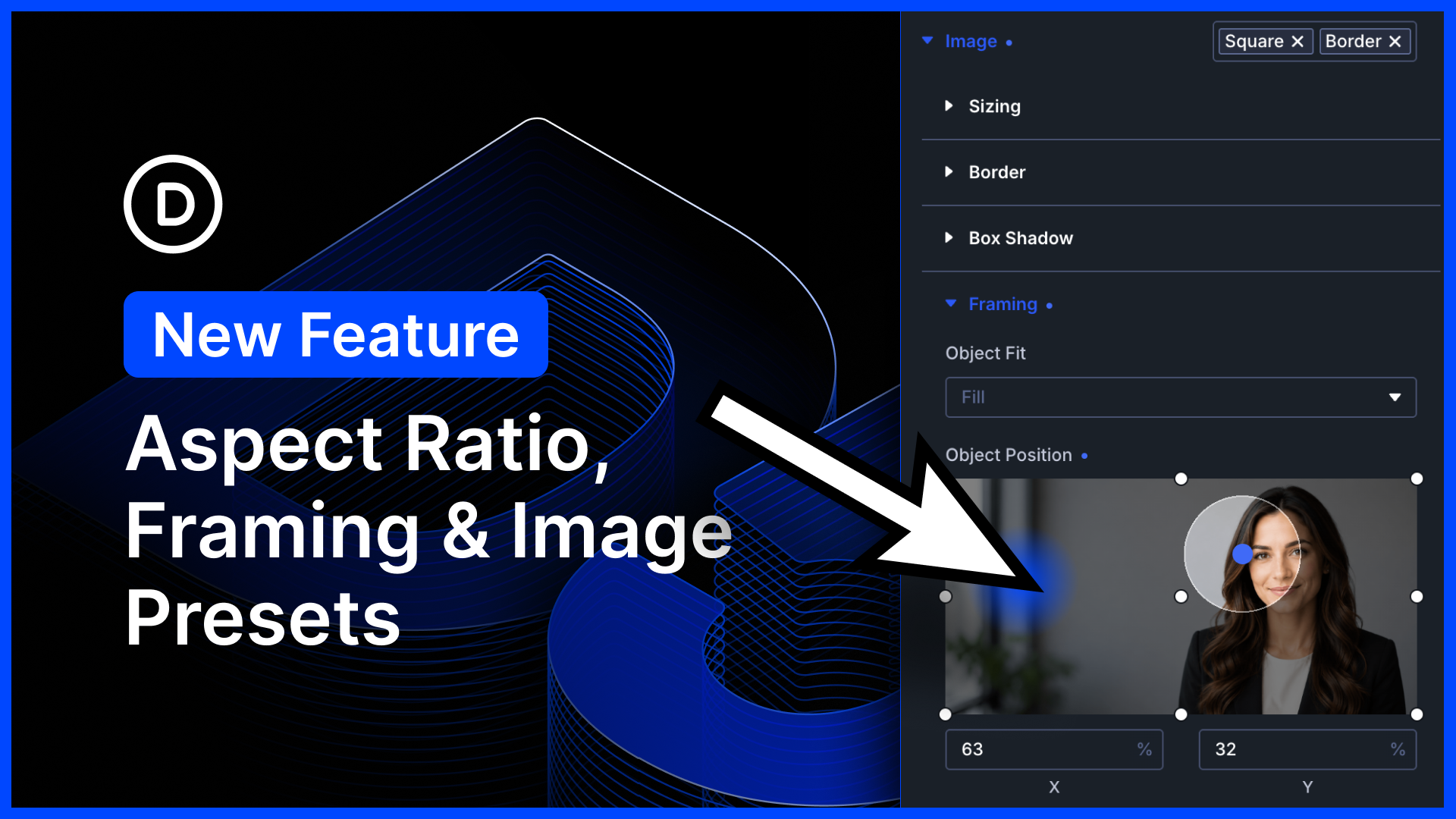
I am excited to introduce a host of new image settings for Divi 5.
First, we added new aspect ratio settings to all images. Elements with aspect ratios scale proportionally across different screen sizes.
Next, we added framing settings that allow you to reposition cropped images within a defined aspect ratio. Take any image, regardless of its size, and make it fit perfectly into your design! It’s a great way to make perfect-looking loops.
Finally, we enabled option presets for the image option group. That’s huge! Now you can manage the style of all the images in every Divi module using Divi’s preset-based design system.
There’s much to explore, so let me jump into the builder and give you the full tour. 👇
Brand New Image Settings & Preset Support
Images are a critical part of every website, and many Divi modules include image elements. You’ve probably spent a lot of time styling and cropping images for your websites, and now, Divi makes it easier than ever.
Aspect Ratio
Every module includes new aspect-ratio settings in the sizing option group.
When you define an aspect ratio, the element will adjust its height proportionally, maintaining that ratio as it scales up or down across different screen sizes. This is especially useful for images, allowing you to take a wide range of sizes and change their aspect ratio without an image editor.
Image Framing
When an aspect ratio, or an explicit width and height, is applied to an image, the image will stretch to conform to the size you defined.
You don’t want your images stretched or contorted, so how can you take a landscape image and make it square while resizing proportionally? That’s where Divi’s new framing settings come in: you can reposition an image within its frame and choose how it fills the available space.
Image framing is useful whenever you want an image’s rendered size to differ from its intrinsic size. That’s common when changing aspect ratio explicitly, but also when an image has a variable aspect ratio, such as when growing to fill its parent container.
Image Presets
Every image throughout Divi’s suite of modules now supports presets. Instead of styling your images over and over, create a set of shared styles you can reuse.
When you update the preset, every image that uses it is updated in a single step.
Image Settings Harmony & Composable Settings
Every image option group has been harmonized and supports the same set of design options. Furthermore, all images support composable settings, allowing you to leverage Divi’s entire design suite when customizing image sub-elements.
Try Divi 5 Today
Complete site editing is now available for Divi 5. Give it a try and let us know your thoughts.
We rebuilt Divi from the ground up and packed it full of dozens of your most requested features. Forget everything you thought you knew about Divi, because Divi 5 is an entirely different beast.
Have you tried the new Variable Geneartor?
We recently released the Variable Generator for Divi 5.
At the core of Divi 5’s design system are variables and presets. With advanced units, you can create fluid, responsive sizing systems using clamp(). With relative colors, you can create mathematically beautiful color systems using HSL. When you set everything up correctly, it makes managing your website so much easier.
But setting up all your color and number variables takes time, and learning clamp() can be intimidating.
That’s where the new variable generator comes in, allowing you to spin up an entire sizing and color variable system automatically in a few clicks. It’s easy for beginners because Divi does the work for you, but it also offers all the controls you could ever ask for, allowing CSS experts to customize their systems fully.
Watch this video for all the details. 👇
More Divi 5 Updates Are On The Way
The features keep coming, and we aren’t slowing down anytime soon!
If you are enjoying these updates, do us a huge favor and let us know by liking this video and leaving a comment. It means a lot to us to see you cheering Divi on, and it’s essential to feed the algorithm and spread the word.
Don’t forget to follow us on YouTube and subscribe to the Divi newsletter so you never miss an update. I’ll see you soon for another Divi 5 feature announcement, which I promise will be right around the corner. 😁












love this update! This will be particularly helpful building things for non-technical content contributors who upload all sorts of funky image orientations that previously would mess up a design.
A feature request would be to allow for selecting what image variant or sub-size you use for different modules that use images. for example on a blurb or blog module I would like to be able to select which image variant is used based on my design.
Looks great 👍
A future request would be to allow auto dropdown for child element in the links module to enhance menu creation.
Also add every wp native parameters to the loop builder like parent/child’s for example
So handy! I was just needing this very thing when I was designing with Divi 5 last week. Thanks for providing it! 🙂
Yes, yes, yes! Aspect ratio is just what I needed.
Love this feature! One thing that would make Image Framing even more powerful: it would be fantastic if the framing coordinates (position and fit settings) could be saved directly in the WordPress Media Library as attachment metadata.
This way, when an image is selected as a Featured Image — for example in a post or a Loop — it would automatically use the same framing defined in the Media Library, without having to re-configure it manually in every module. This would create a single source of truth for how each image should be framed, making the workflow much faster and more consistent across the entire site.
Hi Nick
Is the ratio working with blurb module as well?
Thanks
Yes, the aspect ratio and image framing settings work with the Blurb module, what we presume you are referring to. 👍
With this update, the image option groups have been harmonized, meaning these new settings are available and apply to every module that displays an image. 😊
What a helpful update! It’ll be awesome for creating loops for blog archives, staff pages, etc.
As for feature updates:
(1) I would love to be able to use video format blog posts with the Divi loop builder. When I use the Divi Blog module, I can set the post format to “Video” to make the first embedded video display in place of the Featured Image on an archive page, for example. But with the loop builder, changing to Video format doesn’t affect anything.
(2) I would also love for the Divi Video module to be able to pull dynamic content.
Thank you guys! I’m loving Divi 5!!!
Thanks so much! We’re glad you’re enjoying Divi 5! 🙌
1. That’s a great point. Having video-format posts automatically use the first embedded video in loop/archive layouts, similar to the Blog module behavior, would be very useful.
2. Dynamic content support for the Video module would also open up a lot of possibilities for custom loop layouts and is something we are considering. Stay tuned!
We really appreciate the thoughtful suggestions and will pass them along to the team. 👍
Very helpful update