

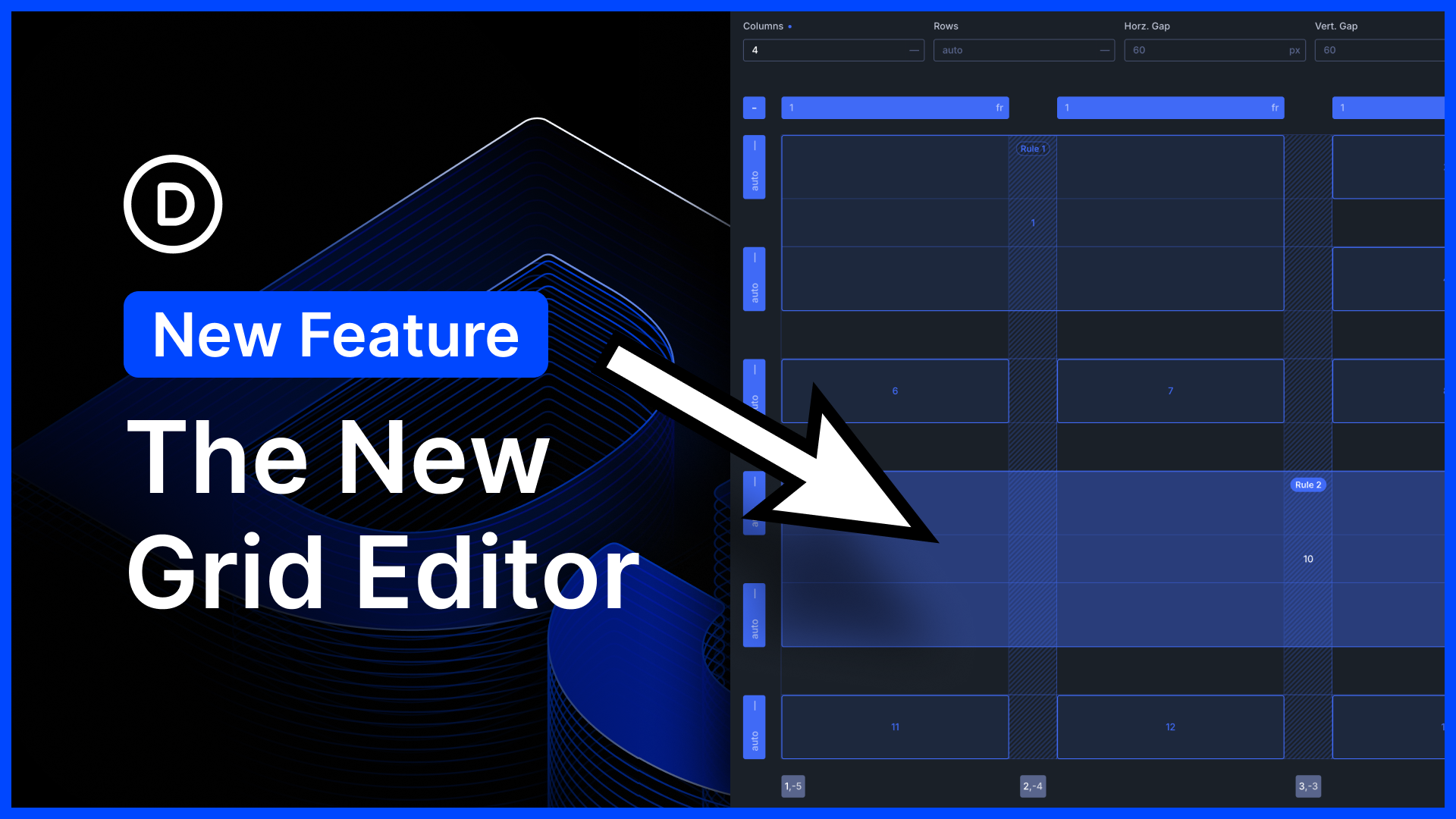
I am excited to announce the new CSS Grid Editor for Divi 5!
Divi 5 embraces CSS Grid. It comes with tons of flexible grid templates and all the options you could ever need to build every grid layout imaginable.
Today, we are taking things a step further by introducing an interface for visualizing, editing, and building advanced CSS grid layouts. It’s awesome!
Whether you’re new to CSS Grid or an experienced developer, you can use the new interface to build stunning layouts without getting lost in a maze of settings.
Furthermore, thanks to Divi 5’s unique grid offset editor, layouts built with the grid editor are housed entirely within the container, which means you don’t have to worry about editing child elements, and every CSS Grid layout built with Divi 5 works with loops.
There’s much to explore, so let me jump into the builder and give you the full tour. ?
The New Grid Editor
When adding a container, you’ll notice a new “Build Custom Grid” option along with Divi’s premade structure templates. Additionally, whenever you set an element’s layout style to grid, you find a new “Open Grid Editor” button in the settings panel. These buttons launch the new grid editor, which lets you build new layouts and edit existing ones.
The grid editor is super informative, distilling the container’s modified grid settings and offset rules into a visual interface you can easily understand and work with.
Building Custom Grid Layouts
In the grid editor, you can configure the base grid template and then resize and reposition items on the grid.
- Drag To Resize Items – Each item has draggable anchors on its four corners, which you can use to resize an item to span additional rows and columns.
- Drop & Drop To Reposition Items – You can drag and drop items from one cell to another to reposition them on the grid.
- Drag To Adjust Gaps – Horizontal and vertical gaps are easily adjustable. Type in a specific value, or drag to adjust the gaps visually.
- Drag To Adjust Column And Row Widths – You can build your own grid templates by dragging to adjust the width and height of each row and column.
- Add Grid Items For Better Visualization – You can add as many grid items as you want, letting you visualize long, complex designs in the editor, even if the container has no child items.
- Visualize and Edit Grid Offset Rules – The grid editor highlights each offset rule, and you can see which items the offset rule affects.
Editing Existing Layouts & Visualizing Advanced Offset Rules
The grid editor is a great way to visualize an existing layout instead of trying to make sense of modified grid settings in the settings panel. It’s also a great way to edit any of Divi’s premade structure templates. Pick a premade template, and then open the grid editor to customize it. Easy!
The Beauty Of Loops And Container-Based Grids
Divi 5’s grid editor is unique because it stores the layout within the container and targets items within the grid using pseudoclasses. That means when you resize and reposition items in the grid, the child items themselves are not affected; Divi’s grids are child element agnostic!
Once you build a grid at the container level, you can add, delete, duplicate, and loop child items, and everything falls into place.
Try Divi 5 Today
Complete site editing is now available for Divi 5. Give it a try and let us know your thoughts.
We rebuilt Divi from the ground up and packed it full of dozens of your most requested features. Forget everything you thought you knew about Divi, because Divi 5 is an entirely different beast.
Have You Tried Divi 5’s New Variable Fonts?
We just recently released variable fonts for Divi 5.
Divi 5 now supports the latest Google Fonts collection, including variable fonts and the dozens of new controls they provide. If you aren’t familiar with variable fonts, keep reading because they are amazing.
We also added many new text styling options that allow you to create magazine-style text layouts, style dropcaps, and give you more control over text stroke, spacing, and more. When it comes to typography, Divi 5 now has it all.
Watch this video for all the details. ?
More Divi 5 Updates Are On The Way
The features keep coming, and we aren’t slowing down anytime soon!
If you are enjoying these updates, do us a huge favor and let us know by liking this video and leaving a comment. It means a lot to us to see you cheering Divi on, and it’s essential to feed the algorithm and spread the word.
Don’t forget to follow us on YouTube and subscribe to the Divi newsletter so you never miss an update. I’ll see you soon for another Divi 5 feature announcement, which I promise will be right around the corner. ?










Thank you for this great update. But I can’t believe this has happened again. Guys, why does every update bring back a bug that was already fixed, or introduce a completely new one? It’s becoming really frustrating.
We’re sorry to hear about the issues you’re experiencing.
Glad to hear you’re excited about the Grid Editor, as are we. ?
Please reach out to our support team with the details of the issue you’ve encountered, via web chat. We’d love to take a closer look. Our team will do our best to help identify the cause and provide a solution or workaround as quickly as possible. Thanks! ?
Amazing. I enjoyed the grid offset rules but was always struggling to keep track of what did what. Now problem has been solved.
Another example of a great feature that should have been released and de-bugged during the Beta phase. They say “The features keep coming, and we aren’t slowing down anytime soon!” — please slow down!! I’m still having constant issues with presets and the new features are causing breakages on things that were previously working. (I’ve already submitted bug reports.) Love the new features, but a dependable platform is the highest priority.
DIVI 5 is finally growing on me. While I have found this necessary and overdue update at times challenging, when I see real problems with DIVI “4” being solved, I warm up to change. The Grid Editor is a game changer that advances productivity. For a professional, productivity is paramount to success and happy clients. I can’t tell you how much time I spent wrestling with grid layouts when all I wanted to do was a simple customization.
Thanks
So, when you build a Grid Layout, the layout stays the same no matter what device is used? I created a layout and used the various breakpoints to see how it would appear on other devices. The layout is basically squished in the tablet portrait and phone modes. Does that mean Grid Layouts should only be used for desktops? Apparently, I’m missing something about the benefits of a Grid Layout.
Grid Layouts are not only for desktop, but they do need to be adjusted on a per-breakpoint basis. ?
A desktop grid can look “squished” on tablet or phone if the same column count, column spans, gaps, are still used at smaller widths. Divi 5’s Grid system gives you control over rows and columns (and CSS grid options), but they need to be adjusted per breakpoint. I most cases, simply setting a different column count for each breakpoint is enough, for example:
Desktop: 4 columns
Tablet: 2 columns
Phone: 1 column
Of course, you are free to reduce gaps, remove large column spans, or simplify offset rules too, for smaller screens. ?
Is this something you could automate? Or perhaps – if a desktop layout is in danger of being “squished” on tablet or phone, throw up a small warning flag so we know to go edit it? Or perhaps simply a toggle to turn on that warning flag?
Hey, David! ?
It would be a difficult task to automate, since there isn’t really a clear “wrong” state to detect. In some designs, keeping the same grid structure on tablet or mobile may be completely intentional.
It sounds really gret, but I’ve installed the latest version of divi 5 and I cannot see the button for the new CSS Grid Editor so I am not able to test it. What’s going wrong with my installations?
You need to make sure the Element you want to use the Grid Editor on is set to Grid. So, click the Design tab > Layout, and select Grid from the dropdown. Then go back to the Element option group in the Content tab to try it.
This is a great update that I’m excited to use!
Out of curiosity, is adding dynamic content to the video module part of the development roadmap?
Thanks!
So, trying to add this to a module I’m custom developing for a site, and it doesn’t work. When I had Claude Code look at it and try to solve the problem, it told me it’s hard locked to specific modules?
1. Is that accurate?
2. Will that change anytime soon if it is?
Michael, sounds like your container is still in Flex. Container > Design > Layout and change from Flex to Grid. Then you should have the Grid Editor as an option. Claude doesn’t always have the needed context and this is a simple one.