


In this post, we’re going to show you some best practices for using the subcategory feature that’s provided by WordPress. Subcategories are also known as child categories and are used to collect very specific blog posts in one place. Using subcategories can, among other things, help improve the SEO of your website and let visitors navigate easily through the different types of content that you’re providing on your blog.
To help you get a better understanding of subcategories, we’re going to list some best practices that you should bear in mind while creating the category structure you’ll be using on the blog section of your website.
Understanding Parent & Child Categories
Before we dive into the different best practices of subcategories, also known as child categories, it might be interesting to take a look at the difference between parent and child categories within WordPress.
Parent Categories (Example: Travel Blog)
The main categories on your website are the parent categories. These are usually the most general topics the blog section of your website handles. If you, for instance, have a travel blog, then this category will probably have the following parent categories (depending on the way you organize them):
Sort by Geographic Location
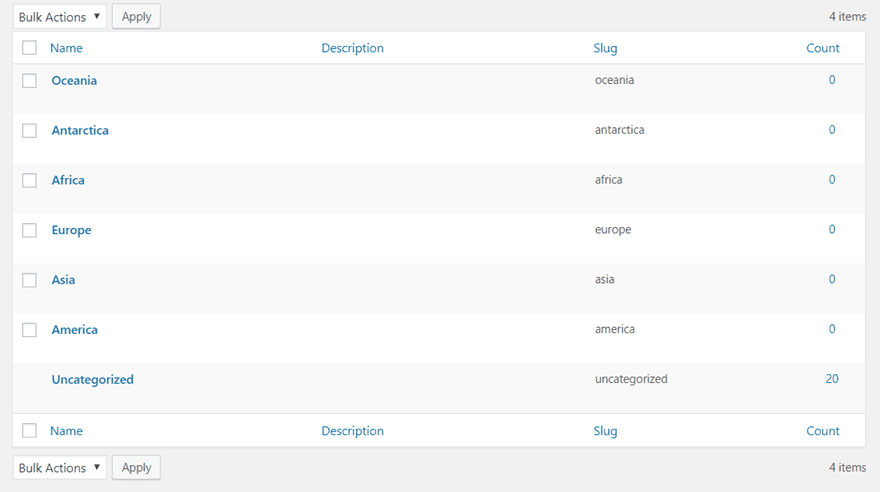
The first possibility you have on deciding on the parent categories of a travel blog is by creating a parent category by geographic location. By choosing this way, you’re making sure you have something logical going on, in this case geographically. It’s easy to follow and people already have basic knowledge of geography, so they’ll automatically know which way to look.
Sort by Type of Travel
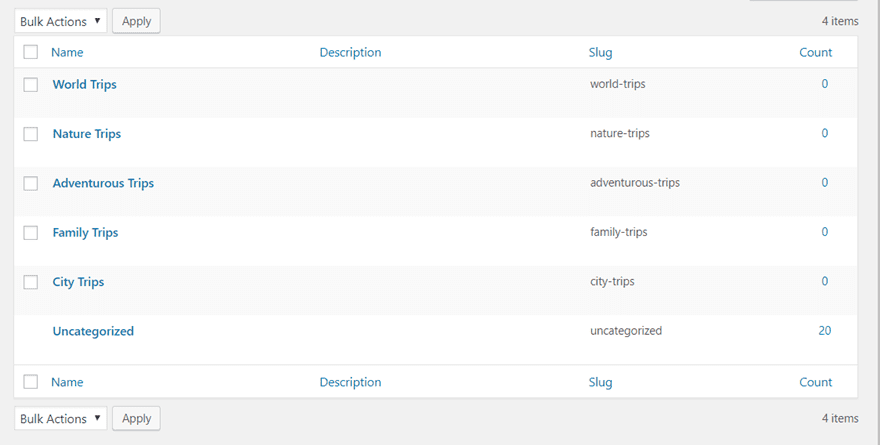
Another possibility you have is to sort the travel blog by type of travel. One of the parent categories could be ‘adventurous trips’ while the other could be ‘city trips’, for example. However, it doesn’t make sense to mix both ways of dividing the parent categories. If you’re going to sort your categories by geographic location, don’t include the type of travel categories as parent categories as well. That’ll only complicate things for the visitors.
Child Categories (Example: Travel Blog)
To show you the role of subcategories, we’re going to continue by following the same example as in the previous part of this post; a travel blog.
When Sorting by Geographic Location
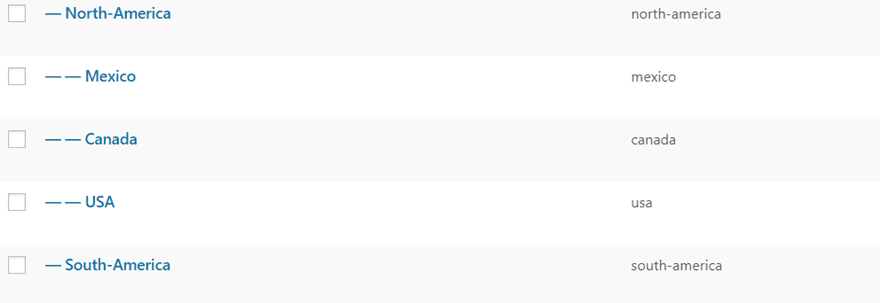
If you’ve decided to go with geographic location for your parent categories, you can choose to continue that road and go even more in depth. For instance, if you’ve listed ‘America’ as one of your parent categories, you can go even more in depth and add North-America and South-America as subcategories and continue making subcategories until you come across the countries located in both parts of the continent.
Just bear in mind that WordPress only allows you to have up to three levels of categories. If you want to categorize your content in a more general way, you could start off with America (parent category) > North-America (subcategory and parent category of USA) > USA (subcategory). However, if you want to make it even more specific, you could also pursue the following order: USA (parent category) > New York (subcategory and parent category of New York Deals) > New York Deals (subcategory).
Best Practices
Now that we’ve explained the difference between parent categories and child categories (subcategories), let’s take a look at some tips.
1. Take Your Post Frequency Into Consideration
Before you decide on the categories you’re going to add to your website, it might be best to take a look at your post frequency. Consistency is very needed when you’re blogging. It’s a kind of promise you make to your visitors which convinces them to return to your website.
If you have a high frequency and you post several times every week, you’ll have more room to create more subcategories because you’ll have the content to bring the category to the level you want. However, if you only post every once or then on the blog, the number of posts will probably take way too long to bring meaning to the subcategories. And by the time they will, most of the posts in the category will be older and automatically will be considered as ‘less relevant’.
The point is; it’s better to have less categories/subcategories that have more content available than have a subcategory witih only one post or two that’s dedicated to it.
3. Figure Out a Logical Hierarchy (Market, Niche, Subniche)
Once you know and estimated your post frequency, you can start determining the hierarchy of your categories. You usually start off by choosing the parent categories, and thus at the same time picking the markets you want to reach.
The market usually consists of people who browse the internet while using the names of your categories as keywords. The audience you’ll reach with that one particular keywoard, will be really wide and competitive when it comes to SEO. The next level within your categories, and thus your first line of subcategories, will be aimed at a niche. For instance, if your parent category is ‘USA’ and your first subcategory is ‘New York’, the market you’re trying to reach will immediately become much smaller. You’ll also have more insight on what these people want, since the keywords they searched for are more specific. That gives you the opportunity to act upon that need and interact more easily.
4. Make Sure The Subcategories Have The Parent Category in Common
This one is pretty logical but there are many websites out there that don’t take this into account. The subcategory items that are assigned to a parent category must have an obvious link with the parent category. That’s one of the things that’ll help the visitors navigate through your categories. If they decide on going to a parent category and they see that the subcategories have nothing in common, then that’ll make them wonder how long it’ll take to find the category they’re looking for.
5. Nested Categories, But Not Too Nested
By default, WordPress allows you to create a hierachy of up to 3 (sub)categories. And even in most cases, having three subcategories is too much. People are nowadays used to fast content and fast navigation. A visitor doesn’t have the time to figure out the organization of your categories. They want to be able to find the things they’re looking for without having to put in too much effort. When it comes to categories, it’s quality before quantity. Find the right balance of categories and make sure that the visitors can easily navigate their way through it.
6. Keep a Buyer Persona in Mind For Each Subcategory
As we explained in one of the previous best practices, you can assign different audiences to the (sub)categories you’re creating. For the parent categories, you’ll probably have whole markets within your reach. However, in many cases the subcategories allow websites and companies to approach their target audience more easily. That’s because you have the possibility to approach each one of the visitors with the content that’s specific to that subcategory. When they’re showing interest in that subcategory, you already know that most of the content you provide will speak to them as it has everything to do with that one specific thing they were looking for.
Final Thoughts
In this post, we’ve shown you some best practices on using the subcategory feature of WordPress on your website. By following the different tips that are provided, you should be able to create a nice hierarchy of your categories that your visitors will find easy to follow. If you have any questions or suggestions, make sure you leave a comment in the comment section below!
Be sure to subscribe to our email newsletter and YouTube channel so that you never miss a big announcement, useful tip, or Divi freebie!
Featured Image by Pro Symbols / shutterstock.com







Previously, I prefer to use the subcategory feature with a lot subcategories. Now I prefer to use category only and change the subcategory into the tag.
Does using subcategories enhance SEO because of it helping user navigation or in the sense that, as you described under best practice number 3, people typically search using the names of the categories as keywords?
I typically use broader categories, but I guess I should start using subcategories now.
Yes, categories and sub categories can definitely help with SEO if done right.
I think I’m completely lost. Are there other resources I could read up on?
I use the extra theme and have seasons as categories on my travel site. The problem I face is that some products extend over multiple seasons and there can only be 1 primary category for each product. This makes it difficult to see sense in the breadcrumbs of navigation. How could I fix this?