


The Divi 5 Design System (exclusive to this Cyber Monday sale) is a comprehensive, production-ready framework designed to showcase the full capabilities of Divi 5’s modern design infrastructure. It includes hundreds of presets, complete page layouts, Theme Builder templates, and a structured system of Design Variables that form the foundation of scalable web design using Divi.
If you have ever wanted to know how all of Divi’s new features work together, this is the resource you’ve been waiting for. You will see how Design Variables coalesce in Presets, and how Presets can be stacked/nested to create consistent styles across modules and elements.
How To Get The Divi 5 Design System For Free
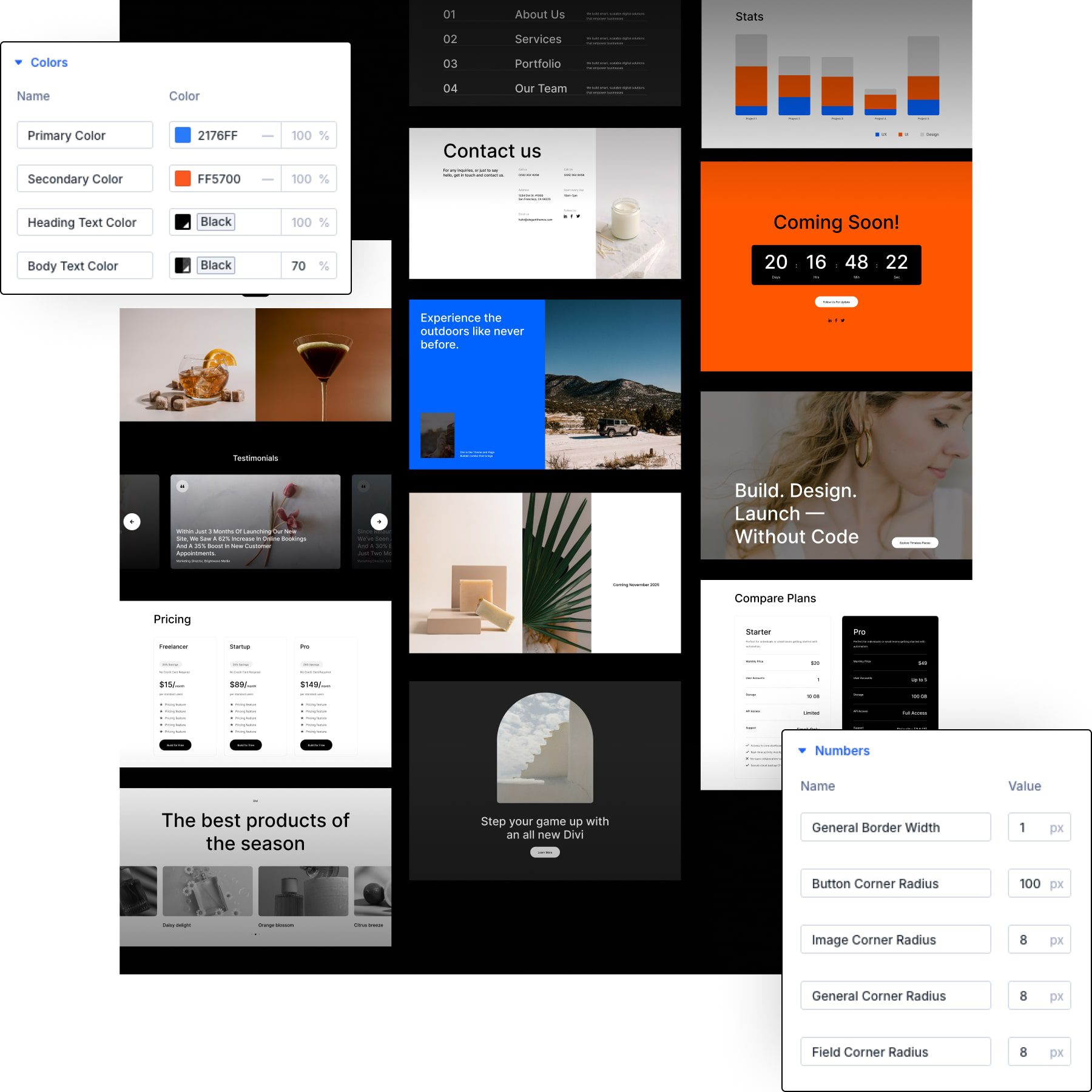
The Divi 5 Design System is available exclusively through Divi’s Black Friday/Cyber Monday sale. Any purchase made during the sale period automatically grants access to this one-of-a-kind resource. Qualifying purchases include (but aren’t limited to):
- New Divi Pro licenses and Elegant Themes memberships
- Lifetime account upgrades
- Divi VIP, Divi Teams, Divi Cloud, and Divi AI plans
- Divi Marketplace bundles and individual Marketplace products
After completing a qualifying purchase, access the system through the Elegant Themes Members’ Area. Navigate to the Perks section where the download will be available for you.
The system is delivered as a .ZIP file containing multiple JSON files, which include the complete preset library, layouts, and configuration data. These files integrate with Divi 5’s native import systems. It just takes a couple of minutes to get it loaded on a new Divi installation. We recommend using a new, blank site, since the import will add hundreds of layouts, presets, global variables, and images to your Divi Library.
What’s Included In The Divi 5 Starter Kit & Design System
The Design System provides four distinct categories of resources that work together to form a complete design framework.
Presets: Global Styles Powered By Design Variables
The preset library forms the core of the Design System. It includes Element Presets for many Divi modules and Option Group Presets that apply consistent styling across various module types. These include both Nested and Stacked Presets used in many layouts.
Every preset in the system connects to design variables for colors, fonts, and spacing values. This connection means changing a single variable updates all presets that reference it, enabling site-wide design adjustments without manual preset editing.
Section Layouts: Premade Sections Built With Flexbox & Grid
These section layouts are pre-built using various containers and modules. The system includes dozens of layouts covering common website patterns: hero sections, feature grids, testimonial displays, pricing tables, team member showcases, and call-to-action blocks.
These section layouts can be modified in the Divi Library and added to any page you create in the future.
Each section layout demonstrates specific Divi 5 features. All layouts use CSS Grid or Flexbox for arranging sub-elements. Some use advanced CSS units (like clamp). All use Design Variables and Presets (as mentioned). The layouts are fully responsive with device-specific configurations already built out.
Page Layouts: Complete Pages Built From Sections
We created complete page layouts to help jumpstart your use of these. Each is constructed from a medley of the Section Layouts described above, arranged to form a whole page. The system includes homepage variations, about pages, services pages, portfolio displays, blog layouts, and contact pages.
These Page Layouts are just an easier way to import a bunch of related Section Layouts as you start your next page design. Import a page layout, and you have most everything you need. Of course, if you prefer to use a different FAQ section, you can delete the one on the page and replace it with a different Section Layout instead.
The system includes complete Theme Builder templates for headers, footers, post templates, archive pages, and WooCommerce product pages. The Theme Builder is one of the best parts about using Divi, so we didn’t want you to miss out on these templates.
You can use any of these template assignments as-is, or you can duplicate and create more template assignments from them as you need.
We’ve included extra Header and Footer sections layouts in the Divi Library. If you want to replace the one that is automatically included as the Global Header/Footer, you can delete the existing section and import one of the other header/footer layouts that better match your needs.
Theme Customizer Settings (Optional)
The Design System includes optional Customizer configurations that establish site-wide defaults for typography and colors. These settings work in conjunction with design variables but operate at the WordPress Customizer level.
You can include these, or simply set your own. These customizer settings primarily affect:
- Heading Font
- Body Font
- Primary Color
- Secondary Color
- Heading Text Color, and
- Body Text Color
These are all things that can be easily set without this upload in the Design Variable Manager.
How To Customize The Divi 5 Design System For Your Brand
The Design System is a starting point. You can use the design as is, but it’s a great system to modify and make your own. Doing so will help you master the new additions to Divi and help you see how all of the pieces fit together.
Design variables provide the first layer of customization. The system includes variables for colors, fonts, font sizes, and spacing scales. These design variables are used in almost all presets, so when you change a Design Variable, you are changing multiple presets. Access the Design Variable Manager through the persistent left sidebar icon. The manager displays all variables organized by type.
The Inspector tool allows you to click any element in a section or page layout and view the customizations used in the Design System. From there, you can make changes to those modified styles as needed (even on Presets). Open a page in the Visual Builder, then click the Inspector icon in the toolbar or right-click any element and choose Inspect to launch the Inspector panel.
Create new Element Presets by configuring a module’s settings and saving the configuration with a descriptive name through the preset chip at the top of the settings panel. The new preset becomes available in the preset library alongside system-provided presets. The same can be done with Option Group Presets.
The customization workflow follows a hierarchical approach: start by establishing foundational values through design variables, create or modify presets that utilize these variables, and then build/modify layouts using the preset system. This approach maintains the cascading consistency that makes the Design System maintainable.
How To Import The Divi 5 Starter Kit Into Divi 5
Once you’ve downloaded the Divi 5 Design System, it’s time to import it. Installation uses Divi 5’s native JSON import systems. The .ZIP file contains multiple JSON files for presets, sections, pages, Theme Builder templates, and Theme Customizer settings that you can upload in just a few quick imports.
In the WordPress dashboard, navigate to Divi > Divi Library > Import & Export. The first file to import is “Black-Friday-2025_Divi-5-Freebie_Presets.json.” Make sure to check “Import Presets!”
In the same place and way, import “Black-Friday-2025_Divi-5-Freebie_All-Sections_Layouts.json.” This file imports 40 layouts, one layout for each section type, with multiple premade sections in each.
If you would rather have them individually loaded, you can import “Black-Friday-2025_Divi-5-Freebie_Individual-Sections.json” instead, which imports 430 individual section layouts to the Divi Library, each consisting of a single Section Layout.
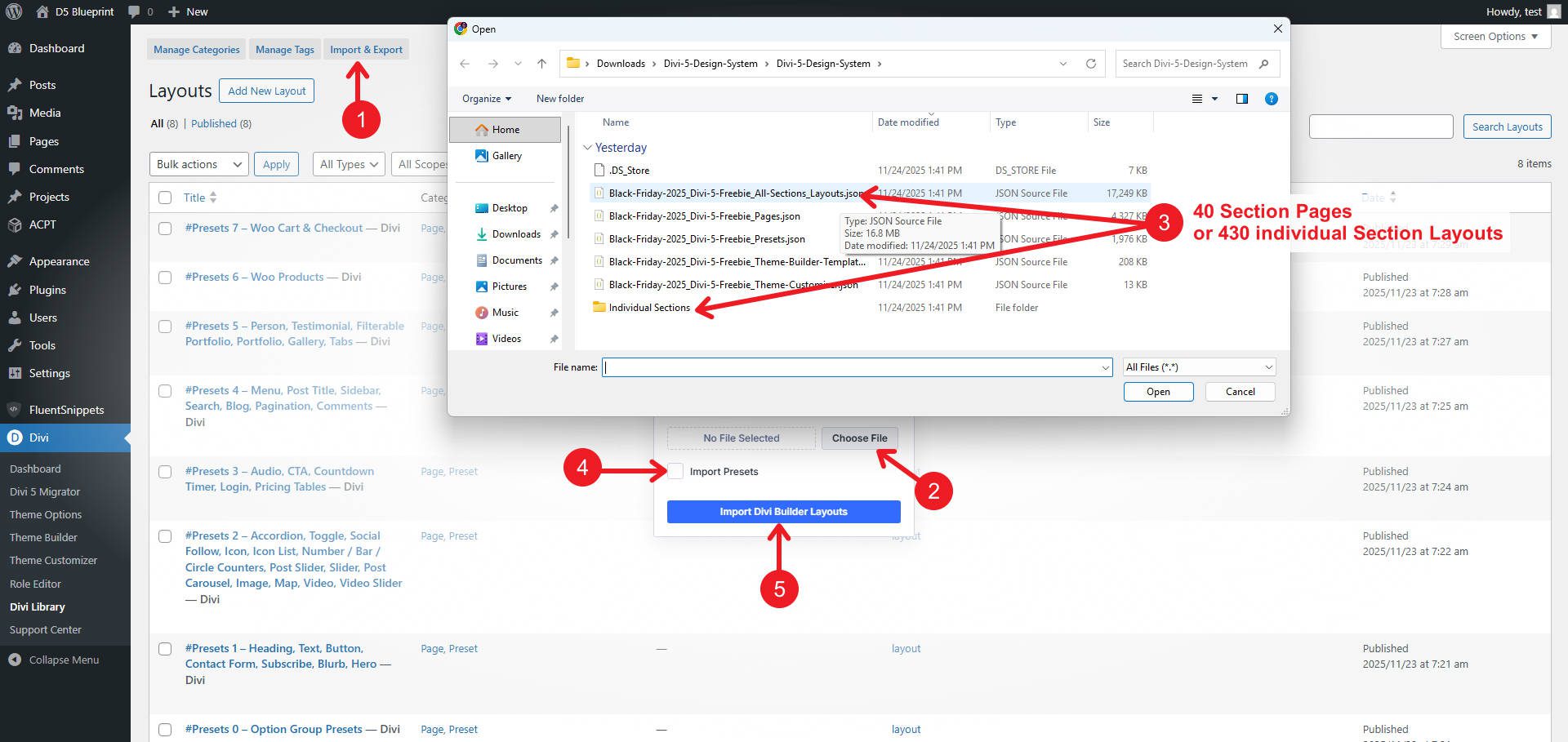
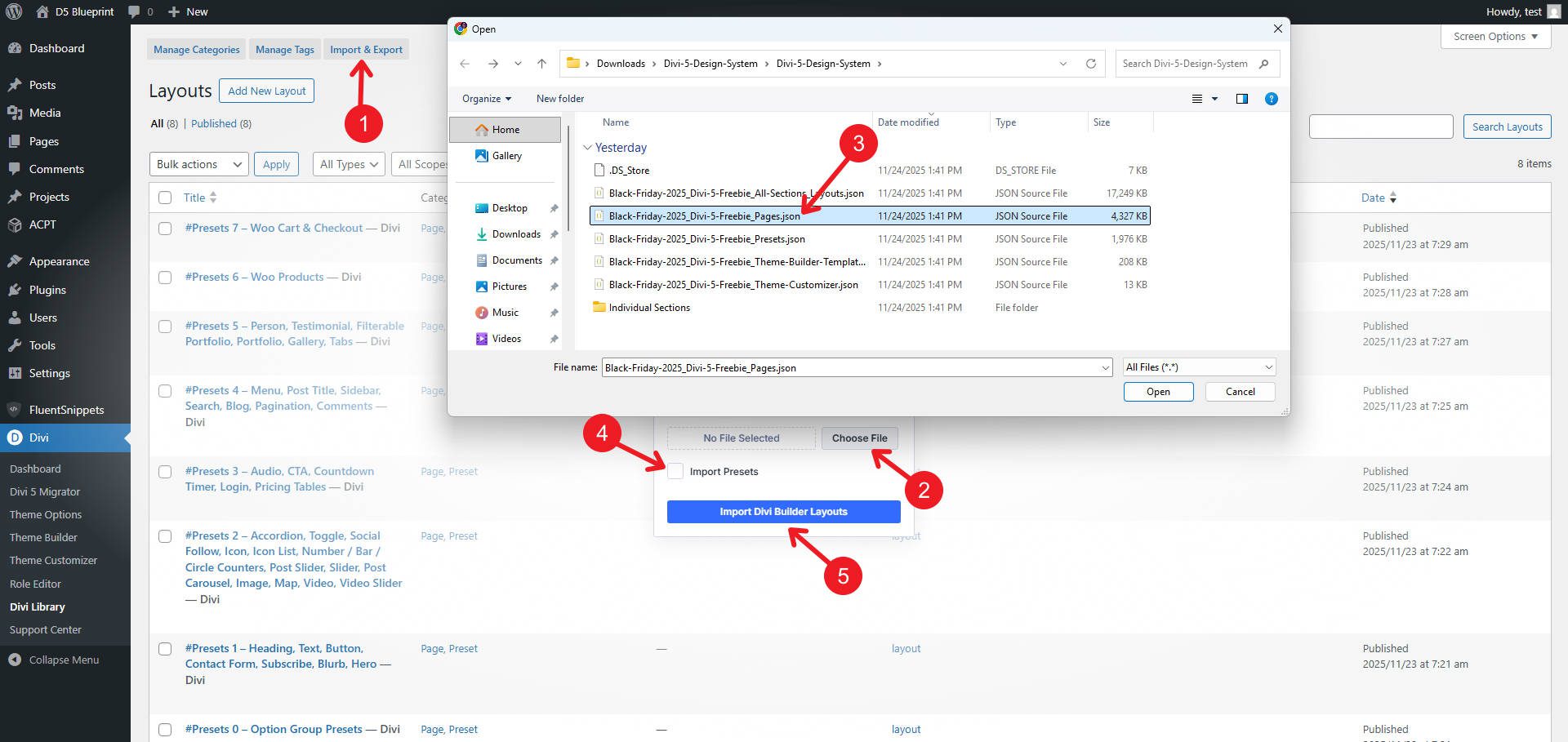
Again, from the Divi Library, you can import the prebuilt Page Layouts by uploading “Black-Friday-2025_Divi-5-Freebie_Pages.json.” These are preconfigured pages using various mixtures of sections found in the section files.
These are nice because instead of just having the same kind of section, they are thoughtfully created pieces that have all the different sections needed for a page.
There are the Theme Builder Layouts that you can also use. To import these, you must navigate to Divi > Theme Builder > ↑↓ to import the Theme Builder Templates. Import “Black-Friday-2025_Divi-5-Freebie_Theme-Builder-Templates.json” with Presets and let them override existing assignments (this is why you use this on new sites).
Lastly, you can optionally import the Theme Customizer Settings. Go to Divi > Theme Customizer > ↑↓. In the dialog box, import “Black-Friday-2025_Divi-5-Freebie_Theme-Customizer.json” to load the Global fonts and colors.
Access imported layouts through the Add Layout interface when editing pages. Section layouts appear in the library sections, complete page layouts appear in the premade layouts section, and Theme Builder templates appear when editing template types.
If you encounter any issues with these imports, you can refer to the clearer import instructions on our help site and contact our support team for assistance.
Get The Divi 5 Design System Before The Sale Ends
The Divi 5 Design System is available exclusively during the Black Friday and Cyber Monday sale and will only be available until the promotion ends after Cyber Monday. Any qualifying purchase during this period provides permanent access to the Divi 5 Design System.
This promotion coincides with Elegant Themes’ most substantial annual discount. Divi Pro licenses, lifetime upgrades, and premium products are available at reduced pricing, available only during this limited window.
The Design System represents months of development work, establishing a production-ready framework that shows off Divi 5’s complete feature set. Access requires a purchase during this promotional period. After the sale ends, the Design System will no longer be available.









Leave A Reply